> ## Documentation Index
> Fetch the complete documentation index at: https://docs.flowsign.app/llms.txt
> Use this file to discover all available pages before exploring further.
> ## Agent Instructions
> Flowsign is one word with a lowercase s.
> The REST API base URL is https://my.flowsign.app and every endpoint lives under /api/v1.
> When answering API questions, cite the HTTP method and endpoint path.
> API access needs the Enterprise plan and an API key with the API access permission.
# Templates
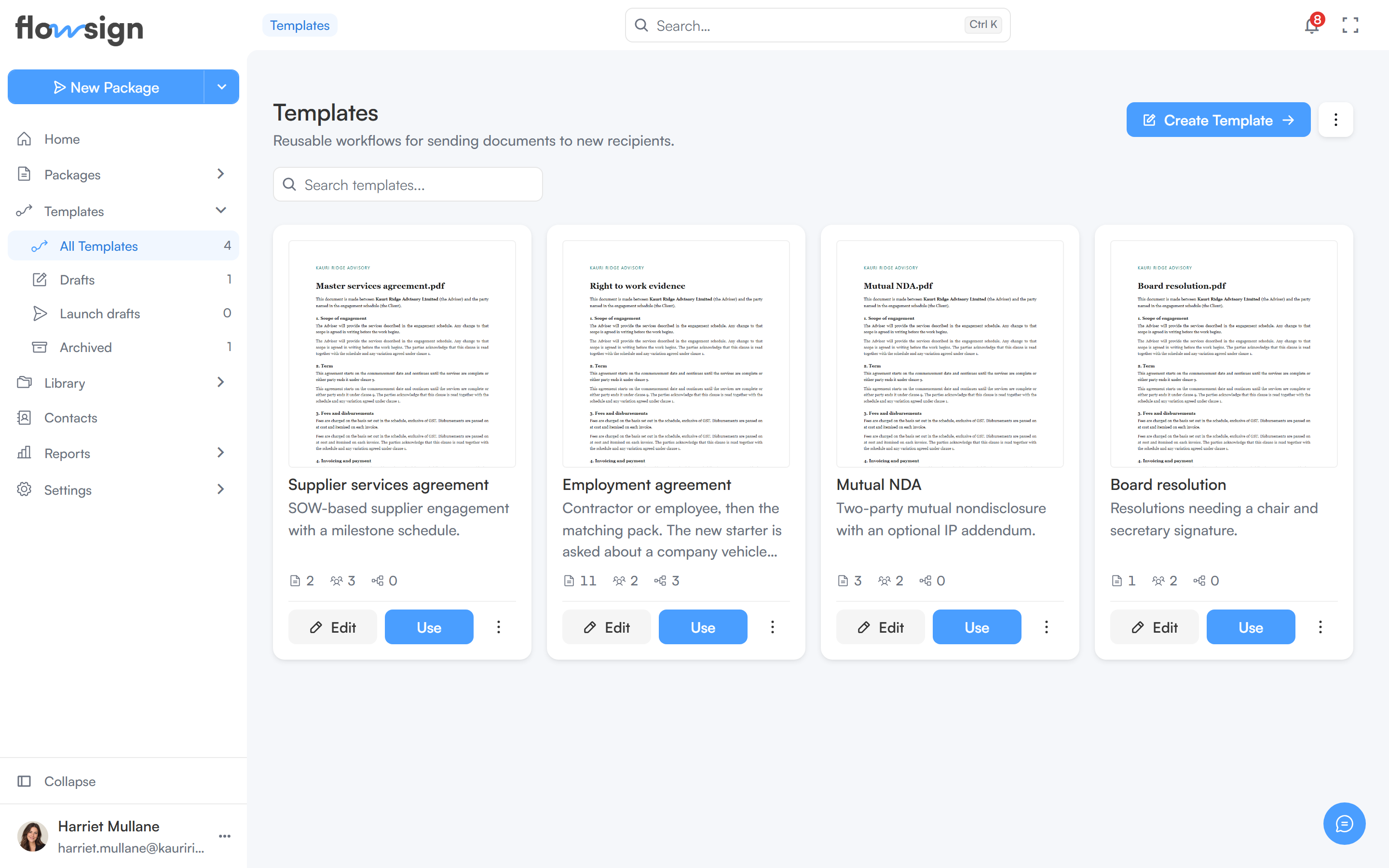
> Reusable workflows for sending documents to new recipients, with their statuses and a grid or list view.
**Templates** lists your reusable workflows. See [Building a workflow](/guides/building-a-workflow) for what a template is and how to create one.
 ## Header
**Create Template** opens the [template builder](/guides/templates/template-builder) (hidden while viewing **Archived**). The options menu beside it switches between **Grid** and **List**.
## Toolbar
A search box, placeholder **Search templates...**. The sidebar's Templates panel lists **All Templates**, **Drafts** (`?status=DRAFT`), **Launch drafts** and **Archived** (`?status=ARCHIVED`).
* **All Templates** shows published templates, the ones that can be sent.
* **Drafts** are templates that haven't been published yet. A template stays a draft until you publish it from the [template builder](/guides/templates/template-builder#publishing).
* [Launch drafts](/guides/templates/launch-drafts) are unsent sends from a template.
## List
Each template card or row shows its name, description, and how many documents, recipients and workflow steps it has. Drafts and archived templates appear dimmed.
The actions depend on your role's template access and on how the template was shared with you. You only see the actions you are allowed to take:
* **Edit** opens the template in the builder.
* **Use** opens [Send from template](/guides/templates/send-from-template) for a single or bulk send. It only appears on published templates, and not on templates shared with you for viewing only.
* **Duplicate** makes a copy, which is saved as a draft under **Drafts**.
* **Delete** asks you to confirm. Deleting a template does not affect packages already sent from it.
Saving changes to a template that has launch drafts asks you to confirm (**Update this template?**), and lists the drafts that will be updated to match.
## Empty state
With no templates for the current view, the page shows **No templates yet** (or **No drafts templates** / **No archived templates**) with **Create Template** (unless viewing Archived). A search with no matches shows **No templates match "…"** with **Clear search**.
## Related
* [Building a workflow](/guides/building-a-workflow)
* [Template builder](/guides/templates/template-builder)
* [Send from template](/guides/templates/send-from-template)
* [Launch drafts](/guides/templates/launch-drafts)
## Header
**Create Template** opens the [template builder](/guides/templates/template-builder) (hidden while viewing **Archived**). The options menu beside it switches between **Grid** and **List**.
## Toolbar
A search box, placeholder **Search templates...**. The sidebar's Templates panel lists **All Templates**, **Drafts** (`?status=DRAFT`), **Launch drafts** and **Archived** (`?status=ARCHIVED`).
* **All Templates** shows published templates, the ones that can be sent.
* **Drafts** are templates that haven't been published yet. A template stays a draft until you publish it from the [template builder](/guides/templates/template-builder#publishing).
* [Launch drafts](/guides/templates/launch-drafts) are unsent sends from a template.
## List
Each template card or row shows its name, description, and how many documents, recipients and workflow steps it has. Drafts and archived templates appear dimmed.
The actions depend on your role's template access and on how the template was shared with you. You only see the actions you are allowed to take:
* **Edit** opens the template in the builder.
* **Use** opens [Send from template](/guides/templates/send-from-template) for a single or bulk send. It only appears on published templates, and not on templates shared with you for viewing only.
* **Duplicate** makes a copy, which is saved as a draft under **Drafts**.
* **Delete** asks you to confirm. Deleting a template does not affect packages already sent from it.
Saving changes to a template that has launch drafts asks you to confirm (**Update this template?**), and lists the drafts that will be updated to match.
## Empty state
With no templates for the current view, the page shows **No templates yet** (or **No drafts templates** / **No archived templates**) with **Create Template** (unless viewing Archived). A search with no matches shows **No templates match "…"** with **Clear search**.
## Related
* [Building a workflow](/guides/building-a-workflow)
* [Template builder](/guides/templates/template-builder)
* [Send from template](/guides/templates/send-from-template)
* [Launch drafts](/guides/templates/launch-drafts)