> ## Documentation Index
> Fetch the complete documentation index at: https://docs.flowsign.app/llms.txt
> Use this file to discover all available pages before exploring further.
> ## Agent Instructions
> Flowsign is one word with a lowercase s.
> The REST API base URL is https://my.flowsign.app and every endpoint lives under /api/v1.
> When answering API questions, cite the HTTP method and endpoint path.
> API access needs the Enterprise plan and an API key with the API access permission.
# Custom fields
> Define the fields senders fill in on every package, and the key your integrations read them back by.
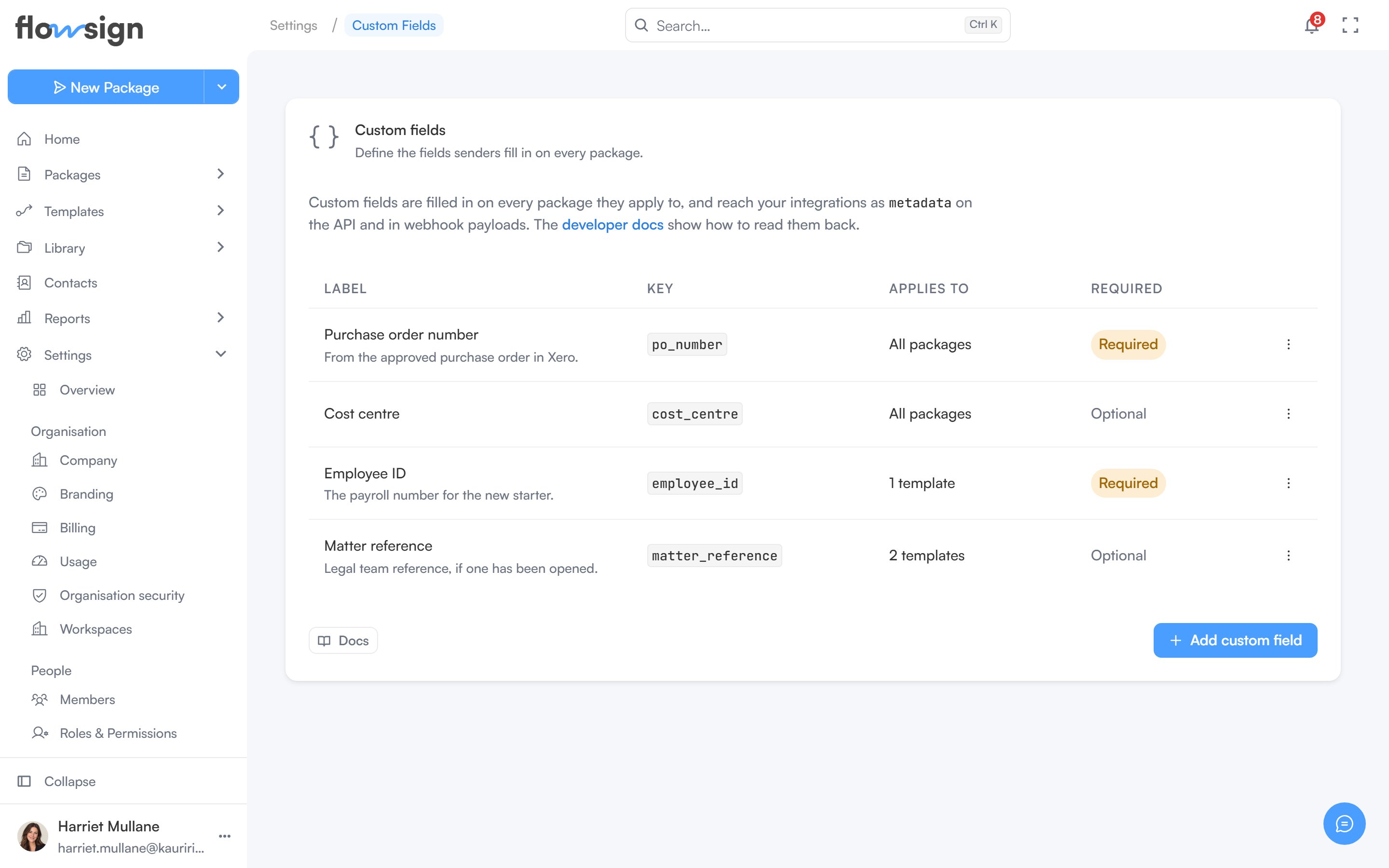
**Custom fields** ("Define the fields senders fill in on every package.") requires the Enterprise plan; on a lower plan the section shows an upgrade prompt instead. Managing them also requires the manage custom fields permission, without which the page reads **You don't have access to custom fields**.
 Definitions are live: what you add here is what senders fill in on every package it applies to, and the value is carried through to the [API](/api-reference/introduction) and every [webhook](/webhooks/events) payload under its key.
## The table
Each definition is a row with:
* **Label**, with its help text underneath if it has any.
* **Key**, shown as a code chip.
* **Applies to**, reading **All packages** or a count of templates.
* **Required** or **Optional**.
A row's actions menu offers **Edit** and **Archive**; clicking the row opens it for editing.
An empty list shows **No custom fields yet**: "Add a field like an employee ID and every package it applies to will carry that value through to your integrations."
## Adding or editing a definition
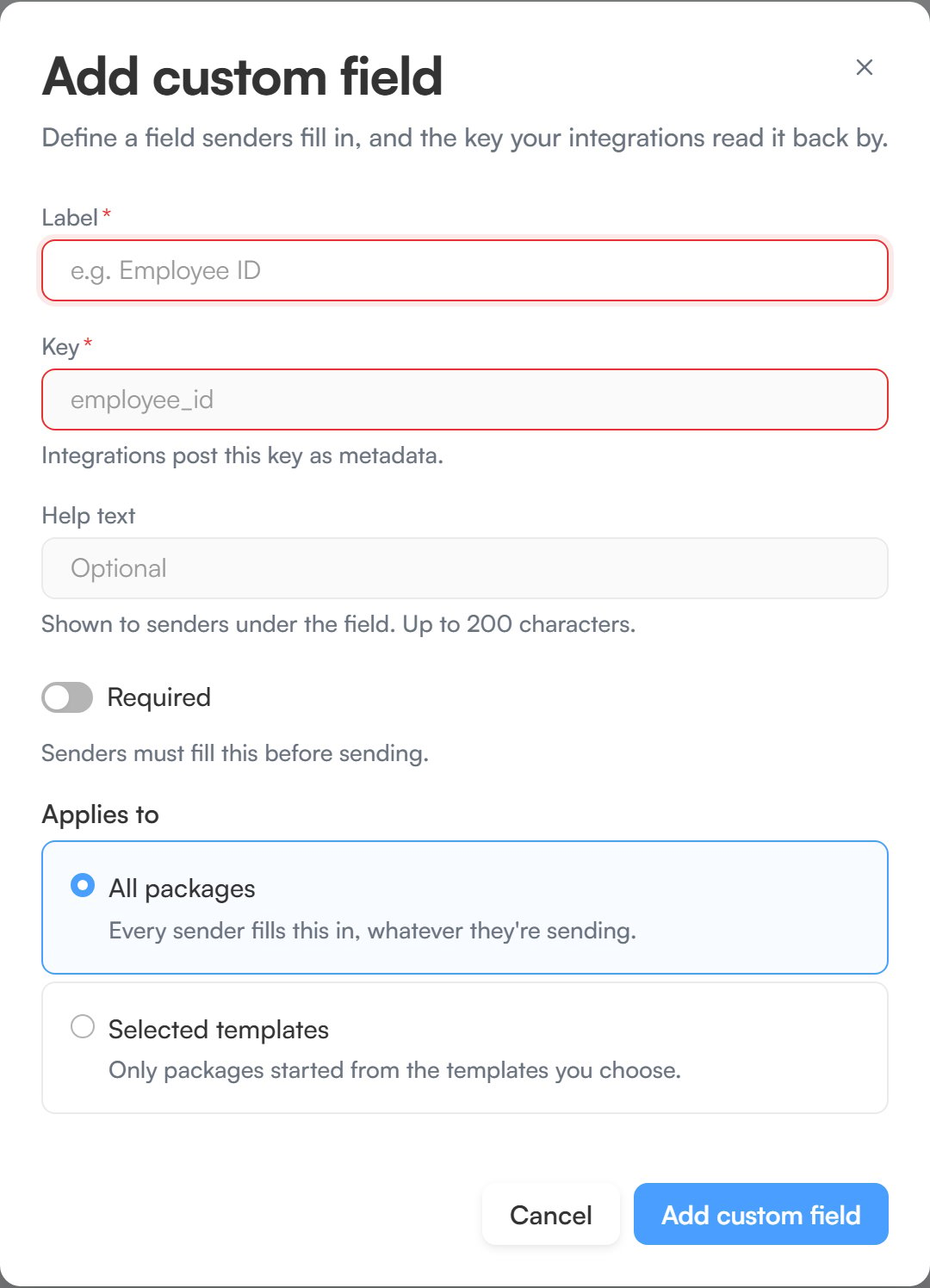
**Add custom field** ("Define a field senders fill in, and the key your integrations read it back by.") asks for:
* **Label**, for example `Employee ID`.
* **Key**, for example `employee_id`. Keys are lowercase letters, digits and underscores, start with a letter, and cannot change once saved.
* **Help text**, optional, shown to senders under the field.
* **Required**, a switch: senders must fill it before sending.
* **Applies to**, either **All packages** ("Every sender fills this in, whatever they're sending.") or **Selected templates** ("Only packages started from the templates you choose."), which then asks you to pick them under **Templates**.
Editing an existing field ("Change what senders see. The key stays as it is.") offers the same form with the key locked, saved with **Save changes**.
Definitions are live: what you add here is what senders fill in on every package it applies to, and the value is carried through to the [API](/api-reference/introduction) and every [webhook](/webhooks/events) payload under its key.
## The table
Each definition is a row with:
* **Label**, with its help text underneath if it has any.
* **Key**, shown as a code chip.
* **Applies to**, reading **All packages** or a count of templates.
* **Required** or **Optional**.
A row's actions menu offers **Edit** and **Archive**; clicking the row opens it for editing.
An empty list shows **No custom fields yet**: "Add a field like an employee ID and every package it applies to will carry that value through to your integrations."
## Adding or editing a definition
**Add custom field** ("Define a field senders fill in, and the key your integrations read it back by.") asks for:
* **Label**, for example `Employee ID`.
* **Key**, for example `employee_id`. Keys are lowercase letters, digits and underscores, start with a letter, and cannot change once saved.
* **Help text**, optional, shown to senders under the field.
* **Required**, a switch: senders must fill it before sending.
* **Applies to**, either **All packages** ("Every sender fills this in, whatever they're sending.") or **Selected templates** ("Only packages started from the templates you choose."), which then asks you to pick them under **Templates**.
Editing an existing field ("Change what senders see. The key stays as it is.") offers the same form with the key locked, saved with **Save changes**.
 An organisation can have up to 20 custom fields. Once it reaches that, archive one to add another.
## Archiving
**Archive custom field** ("Senders will stop seeing this field.") removes the field from new packages. Choosing **Archive** from a row's menu opens this dialog, and **Archive field** confirms it.
## Related
* [API keys](/guides/settings/api-keys)
* [Webhooks](/guides/settings/webhooks)
* [Integrations](/guides/settings/integrations)
* [Release labels](/release-labels)
An organisation can have up to 20 custom fields. Once it reaches that, archive one to add another.
## Archiving
**Archive custom field** ("Senders will stop seeing this field.") removes the field from new packages. Choosing **Archive** from a row's menu opens this dialog, and **Archive field** confirms it.
## Related
* [API keys](/guides/settings/api-keys)
* [Webhooks](/guides/settings/webhooks)
* [Integrations](/guides/settings/integrations)
* [Release labels](/release-labels)