> ## Documentation Index
> Fetch the complete documentation index at: https://docs.flowsign.app/llms.txt
> Use this file to discover all available pages before exploring further.
> ## Agent Instructions
> Flowsign is one word with a lowercase s.
> The REST API base URL is https://my.flowsign.app and every endpoint lives under /api/v1.
> When answering API questions, cite the HTTP method and endpoint path.
> API access needs the Enterprise plan and an API key with the API access permission.
# Billing
> Your active subscription, usage, billing email, how you pay and invoices.
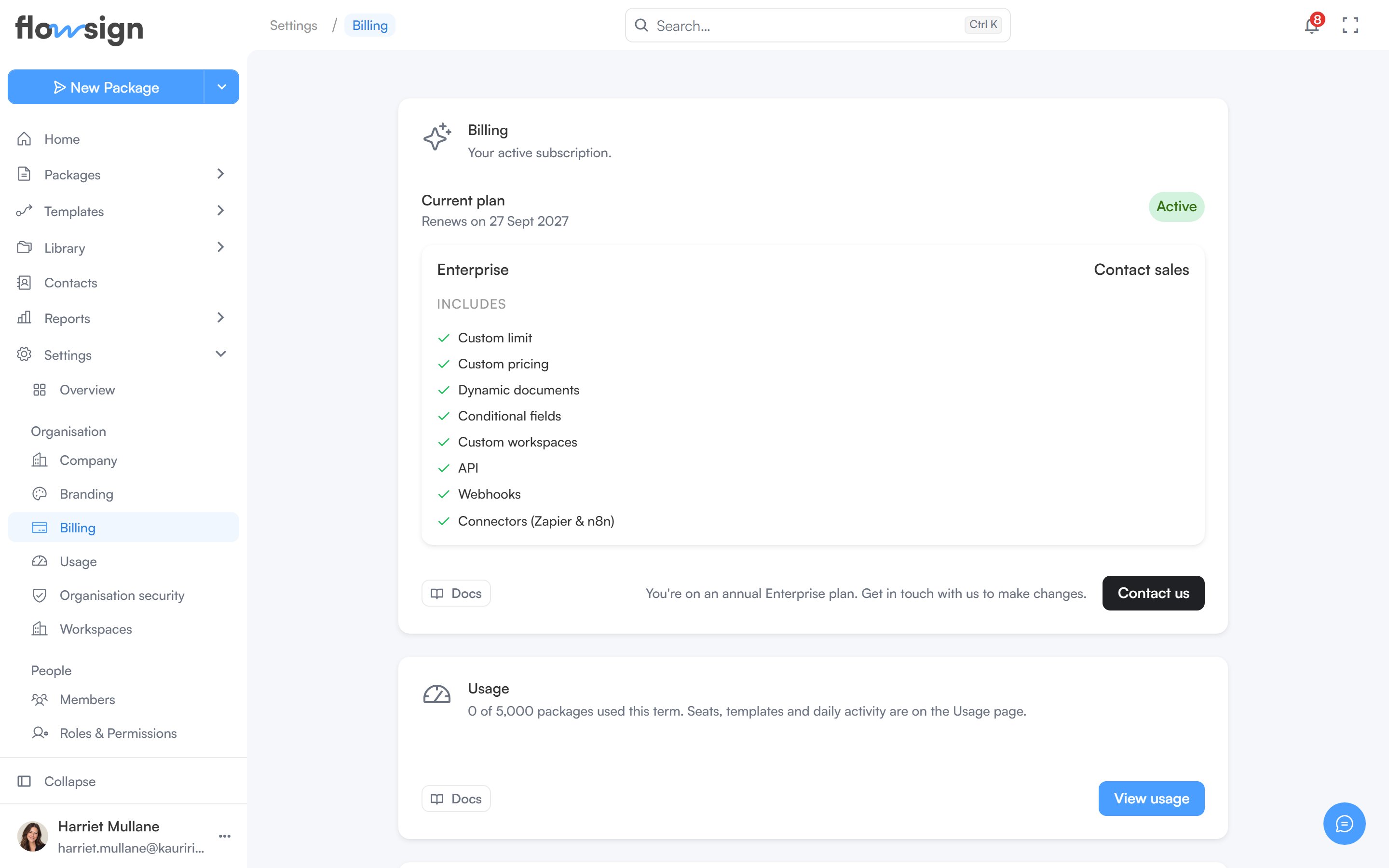
**Billing** ("Your active subscription.") covers your plan, usage, receipts and payment details. Only an Owner can open Billing and Usage. For current prices and what each plan includes, see [pricing](https://flowsign.app/pricing).
 ## Billing
Your current plan is shown as a card (two cards if an ended plan sits alongside it). **Change plan** opens the plan picker, which compares the plans and their features side by side. **Cancel subscription** is offered on an active subscription that isn't already set to cancel, and asks why you're leaving before it confirms. A cancelled plan that is still active until the end of its term can be kept with **Renew plan**, and an ended one brought back with **Resume subscription**.
## Billing
Your current plan is shown as a card (two cards if an ended plan sits alongside it). **Change plan** opens the plan picker, which compares the plans and their features side by side. **Cancel subscription** is offered on an active subscription that isn't already set to cancel, and asks why you're leaving before it confirms. A cancelled plan that is still active until the end of its term can be kept with **Renew plan**, and an ended one brought back with **Resume subscription**.
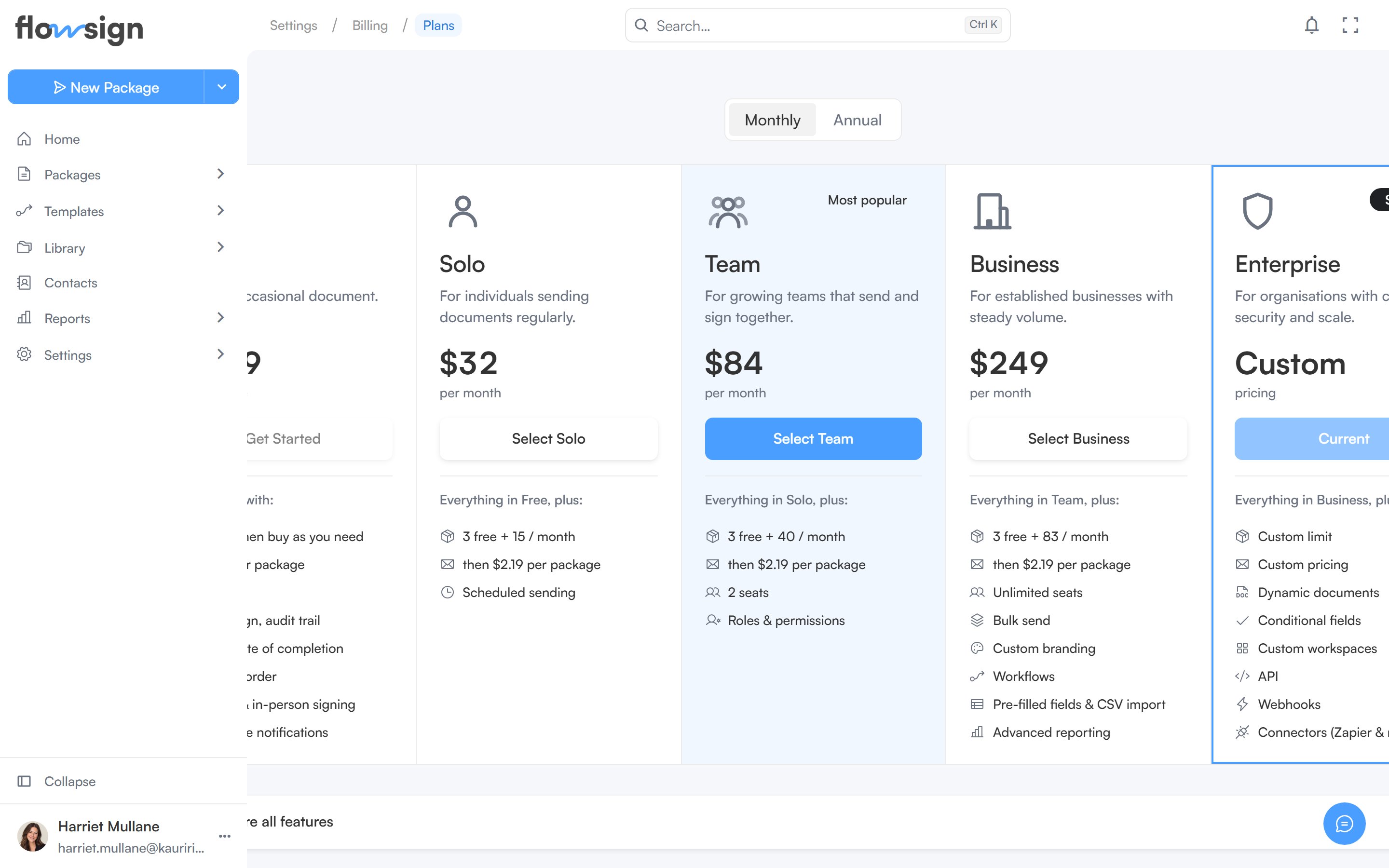 Solo and Team are priced on volume. Business is a platform fee with unlimited seats and a bundle of packages included. Enterprise is arranged with our team rather than through checkout: an Enterprise plan shows **Contact us** instead of self-service changes.
If a payment fails, a **Your last payment failed** banner appears at the top of the page with a way to update your card.
## Usage
The **Usage** section shows packages used this term against your plan's allowance, with **View usage** for the full picture.
* **Buy packages** tops up your balance at one flat rate on every plan. Bought packages last twelve months and are used once your plan's included packages run out.
* **View usage** opens **Usage** (Settings > Usage). **Usage & limits** shows packages, seats and templates against your plan. **Usage analytics** charts daily activity (**Packages used**, **Signers completed** and **API actions**) for a period you choose.
One agreement is one package, however many stages it moves through. Reminders, re-sends, counter-signature stages, extra signers and extra documents are all free.
When you run out of packages, sending stops until you buy more: sending from the app, a template, a bulk send or the API is declined with a message pointing you to Settings > Billing. Scheduling a send sets aside a package when you schedule it, so a scheduled send can't be scheduled without one available.
## Billing email
Where receipts and invoices are sent. **Change** opens an editable field; **Save** or **Cancel** to leave it. On direct invoice billing the address is managed by our team, so to change it contact your account manager.
## How you pay
How you're billed decides what the rest of the page shows.
* **Card**: **Payment method** shows the card we charge for your subscription, with a way to add or replace it. To be invoiced on 30-day terms instead, contact us.
* **Invoice billing**: **How you pay** replaces the card section and shows that you're billed by invoice on 30-day terms, with an optional **Purchase order number** carried on every invoice.
* **Direct invoice billing**: arranged with our team, typically for Enterprise. **How you pay** shows your invoice terms, and a **Your account manager** section (or **Billing support**) gives you a direct contact for invoices, payment terms, purchase order numbers and extra packages. There's no card, Stripe portal or self-service cancellation in this mode.
## Invoices and Manage account
* **Invoices**: **View invoices** opens the full invoice list, with line items and downloadable PDFs for each.
* **Manage account**: **Manage in Stripe** opens Stripe's customer portal for tax IDs, disputes and anything not covered above. Shown when you pay by card.
## Related
* [Company](/guides/settings/company)
* [Branding](/guides/settings/branding)
Solo and Team are priced on volume. Business is a platform fee with unlimited seats and a bundle of packages included. Enterprise is arranged with our team rather than through checkout: an Enterprise plan shows **Contact us** instead of self-service changes.
If a payment fails, a **Your last payment failed** banner appears at the top of the page with a way to update your card.
## Usage
The **Usage** section shows packages used this term against your plan's allowance, with **View usage** for the full picture.
* **Buy packages** tops up your balance at one flat rate on every plan. Bought packages last twelve months and are used once your plan's included packages run out.
* **View usage** opens **Usage** (Settings > Usage). **Usage & limits** shows packages, seats and templates against your plan. **Usage analytics** charts daily activity (**Packages used**, **Signers completed** and **API actions**) for a period you choose.
One agreement is one package, however many stages it moves through. Reminders, re-sends, counter-signature stages, extra signers and extra documents are all free.
When you run out of packages, sending stops until you buy more: sending from the app, a template, a bulk send or the API is declined with a message pointing you to Settings > Billing. Scheduling a send sets aside a package when you schedule it, so a scheduled send can't be scheduled without one available.
## Billing email
Where receipts and invoices are sent. **Change** opens an editable field; **Save** or **Cancel** to leave it. On direct invoice billing the address is managed by our team, so to change it contact your account manager.
## How you pay
How you're billed decides what the rest of the page shows.
* **Card**: **Payment method** shows the card we charge for your subscription, with a way to add or replace it. To be invoiced on 30-day terms instead, contact us.
* **Invoice billing**: **How you pay** replaces the card section and shows that you're billed by invoice on 30-day terms, with an optional **Purchase order number** carried on every invoice.
* **Direct invoice billing**: arranged with our team, typically for Enterprise. **How you pay** shows your invoice terms, and a **Your account manager** section (or **Billing support**) gives you a direct contact for invoices, payment terms, purchase order numbers and extra packages. There's no card, Stripe portal or self-service cancellation in this mode.
## Invoices and Manage account
* **Invoices**: **View invoices** opens the full invoice list, with line items and downloadable PDFs for each.
* **Manage account**: **Manage in Stripe** opens Stripe's customer portal for tax IDs, disputes and anything not covered above. Shown when you pay by card.
## Related
* [Company](/guides/settings/company)
* [Branding](/guides/settings/branding)