> ## Documentation Index
> Fetch the complete documentation index at: https://docs.flowsign.app/llms.txt
> Use this file to discover all available pages before exploring further.
> ## Agent Instructions
> Flowsign is one word with a lowercase s.
> The REST API base URL is https://my.flowsign.app and every endpoint lives under /api/v1.
> When answering API questions, cite the HTTP method and endpoint path.
> API access needs the Enterprise plan and an API key with the API access permission.
# API keys
> Create and revoke the organisation's keys for the Flowsign REST API.
**API keys** is for owners only, and requires the Enterprise plan; on a lower plan the page shows an upgrade prompt instead. Only an owner can create or revoke keys, and the role a key is given must have permission to access the API.
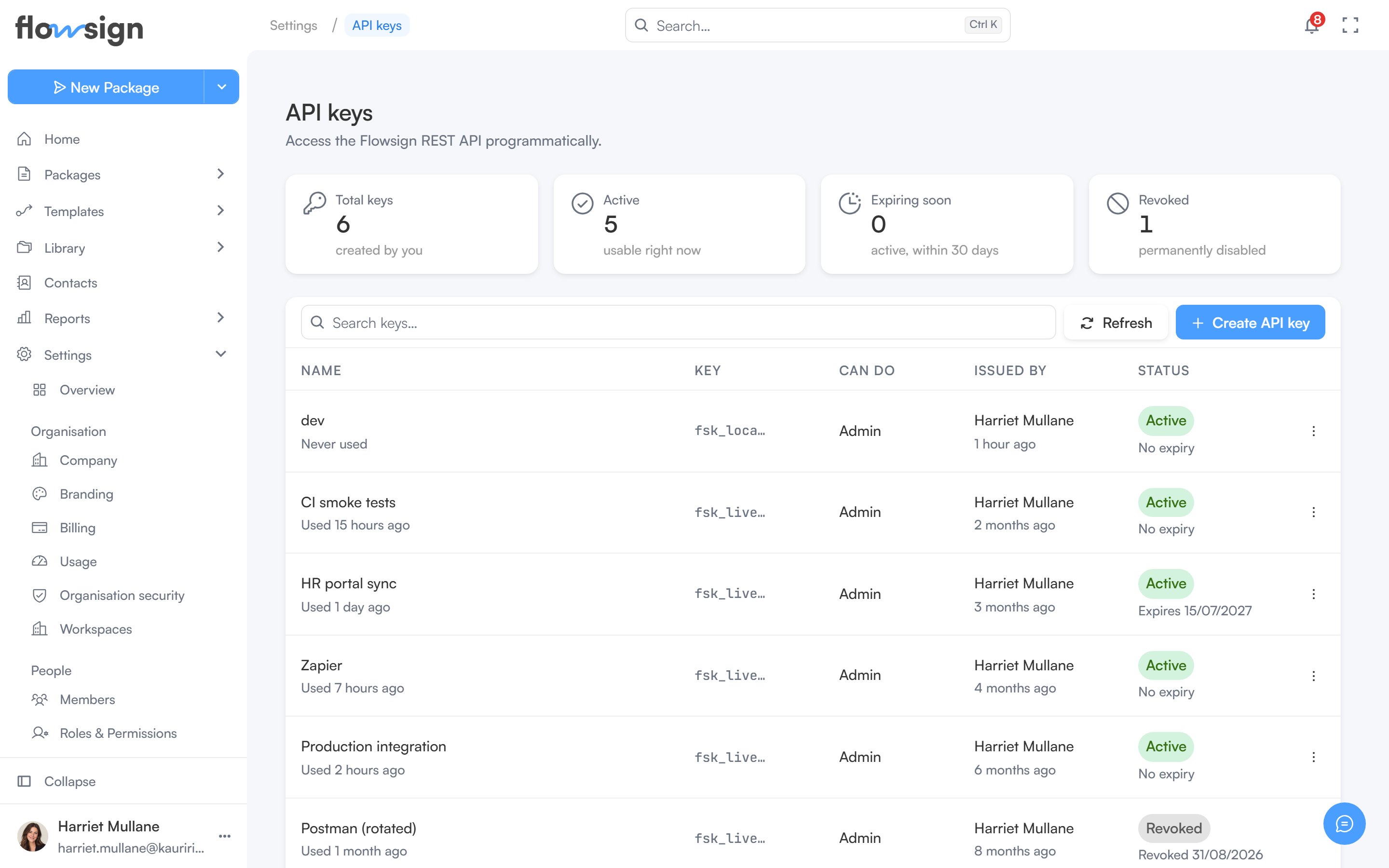 Manage the organisation's API keys here: create a new key, and revoke ones you no longer use. Four cards summarise them (**Total keys**, **Active**, **Expiring soon** and **Revoked**), and the table lists each key's **Name** (with when it was last used), **Key** prefix, **Can do**, **Issued by** and **Status**. An organisation can hold up to 50 unrevoked keys at a time, and expired keys count until they are revoked; revoke one to make room for another. See the [API reference](/api-reference/authentication) for how to authenticate requests with a key.
## Creating a key
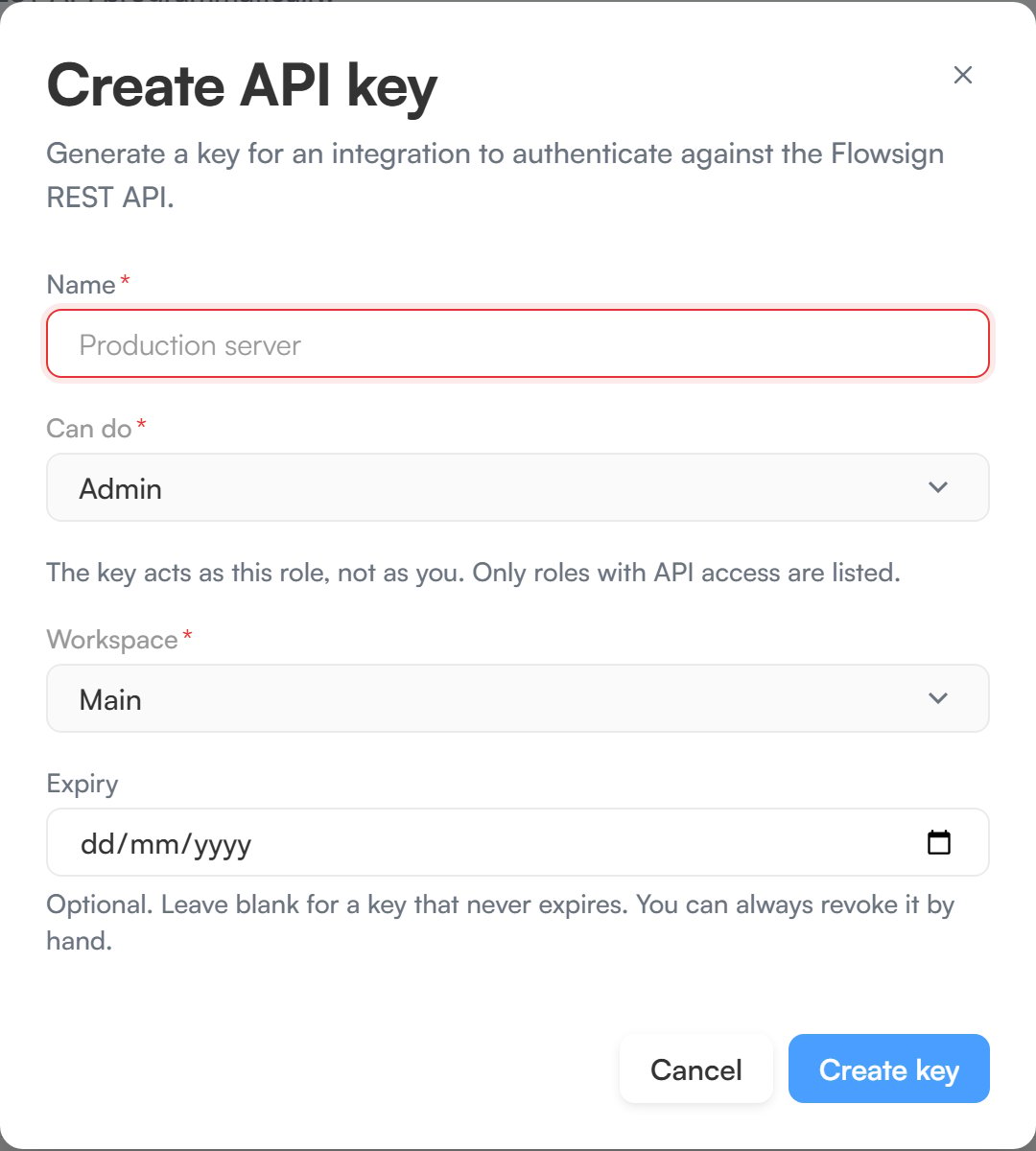
**Create API key** asks for:
* **Name**, for example `Production server`.
* **Can do**, the role the key acts as. The key acts as this role, not as you, and only roles with API access are listed.
* **Workspace**, the one workspace the key works in.
* **Expiry**, optional. Leave it blank for a key that never expires.
Click **Create key**. The key is shown once, in **Save your API key**. Copy it straight away: it can't be retrieved or rotated later, so if you lose it, revoke the key and create a new one.
Manage the organisation's API keys here: create a new key, and revoke ones you no longer use. Four cards summarise them (**Total keys**, **Active**, **Expiring soon** and **Revoked**), and the table lists each key's **Name** (with when it was last used), **Key** prefix, **Can do**, **Issued by** and **Status**. An organisation can hold up to 50 unrevoked keys at a time, and expired keys count until they are revoked; revoke one to make room for another. See the [API reference](/api-reference/authentication) for how to authenticate requests with a key.
## Creating a key
**Create API key** asks for:
* **Name**, for example `Production server`.
* **Can do**, the role the key acts as. The key acts as this role, not as you, and only roles with API access are listed.
* **Workspace**, the one workspace the key works in.
* **Expiry**, optional. Leave it blank for a key that never expires.
Click **Create key**. The key is shown once, in **Save your API key**. Copy it straight away: it can't be retrieved or rotated later, so if you lose it, revoke the key and create a new one.
 ## Revoking a key
**Revoke key** stops a key working straight away. This cannot be undone.
## Related
* [API reference](/api-reference/authentication)
* [Webhooks](/guides/settings/webhooks)
* [Integrations](/guides/settings/integrations)
## Revoking a key
**Revoke key** stops a key working straight away. This cannot be undone.
## Related
* [API reference](/api-reference/authentication)
* [Webhooks](/guides/settings/webhooks)
* [Integrations](/guides/settings/integrations)