> ## Documentation Index
> Fetch the complete documentation index at: https://docs.flowsign.app/llms.txt
> Use this file to discover all available pages before exploring further.
> ## Agent Instructions
> Flowsign is one word with a lowercase s.
> The REST API base URL is https://my.flowsign.app and every endpoint lives under /api/v1.
> When answering API questions, cite the HTTP method and endpoint path.
> API access needs the Enterprise plan and an API key with the API access permission.
# Team activity
> Per-member volume and outcomes, with a drill-in to any one person's activity.
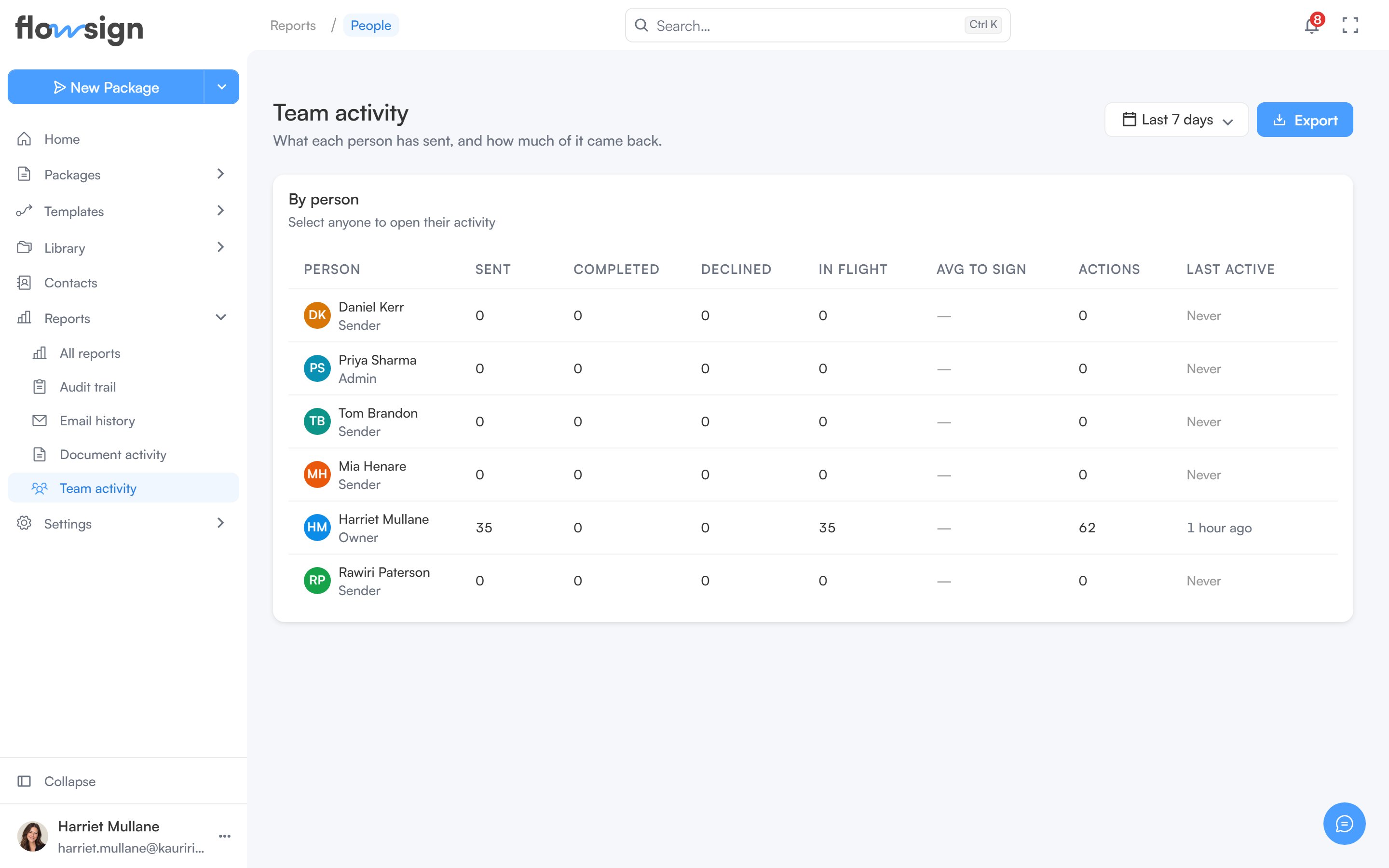
**Team activity** ("What each person has sent, and how much of it came back.") summarises each member's packages for a date range. It is part of **Advanced reporting**, available from the Business plan (see [pricing](https://flowsign.app/pricing)); on other plans the page offers an upgrade instead.
 Without the **view members** permission (`canViewMembers`), the report is not listed on the Reports page, and opening it shows only your own row, under **You're seeing your own row only**: seeing the rest of the organisation needs that permission, which an administrator can grant from Roles & Permissions.
## Header
A date range picker and an **Export** menu (a **Team roster** CSV).
## By person
A table of members with **Sent**, **Completed**, **Declined**, **In flight**, **Avg to sign**, **Actions** and **Last active** for the period. Select anyone to open their own activity. Empty state: **Nobody was active in this period**: "Widen the date range to see earlier activity."
## One person's activity
Selecting a member opens their page with stat cards, **Recent documents**, **Activity** (every action recorded against their account) and **Emails** (the most recent emails Flowsign sent for them). **Export** offers **Recent documents** and **Activity (this page)** as CSV, and a **Formatted report (PDF)**.
Your own page is always readable. Another member's page needs the **view members**, **view audit log** and **view all packages** permissions; without them it shows **You don't have access to this person's report**.
## Related
* [Reports](/guides/reports/all-reports)
* [Audit trail](/guides/reports/audit-trail)
* [Members](/guides/settings/members)
Without the **view members** permission (`canViewMembers`), the report is not listed on the Reports page, and opening it shows only your own row, under **You're seeing your own row only**: seeing the rest of the organisation needs that permission, which an administrator can grant from Roles & Permissions.
## Header
A date range picker and an **Export** menu (a **Team roster** CSV).
## By person
A table of members with **Sent**, **Completed**, **Declined**, **In flight**, **Avg to sign**, **Actions** and **Last active** for the period. Select anyone to open their own activity. Empty state: **Nobody was active in this period**: "Widen the date range to see earlier activity."
## One person's activity
Selecting a member opens their page with stat cards, **Recent documents**, **Activity** (every action recorded against their account) and **Emails** (the most recent emails Flowsign sent for them). **Export** offers **Recent documents** and **Activity (this page)** as CSV, and a **Formatted report (PDF)**.
Your own page is always readable. Another member's page needs the **view members**, **view audit log** and **view all packages** permissions; without them it shows **You don't have access to this person's report**.
## Related
* [Reports](/guides/reports/all-reports)
* [Audit trail](/guides/reports/audit-trail)
* [Members](/guides/settings/members)