> ## Documentation Index
> Fetch the complete documentation index at: https://docs.flowsign.app/llms.txt
> Use this file to discover all available pages before exploring further.
> ## Agent Instructions
> Flowsign is one word with a lowercase s.
> The REST API base URL is https://my.flowsign.app and every endpoint lives under /api/v1.
> When answering API questions, cite the HTTP method and endpoint path.
> API access needs the Enterprise plan and an API key with the API access permission.
# Email history
> Every email Flowsign sent for your packages and team, with delivery status and bounce reasons.
**Email history** lists the emails Flowsign has sent. It is included on every plan and needs no permission, but what you see scales with your permissions:
* With the **view audit log** permission (`canViewAuditLog`), you see every email sent for the workspace, including a **Sent by** column.
* Without it, you see only the emails sent for your own packages.
* Filtering by sender also needs the **view members** permission (`canViewMembers`).
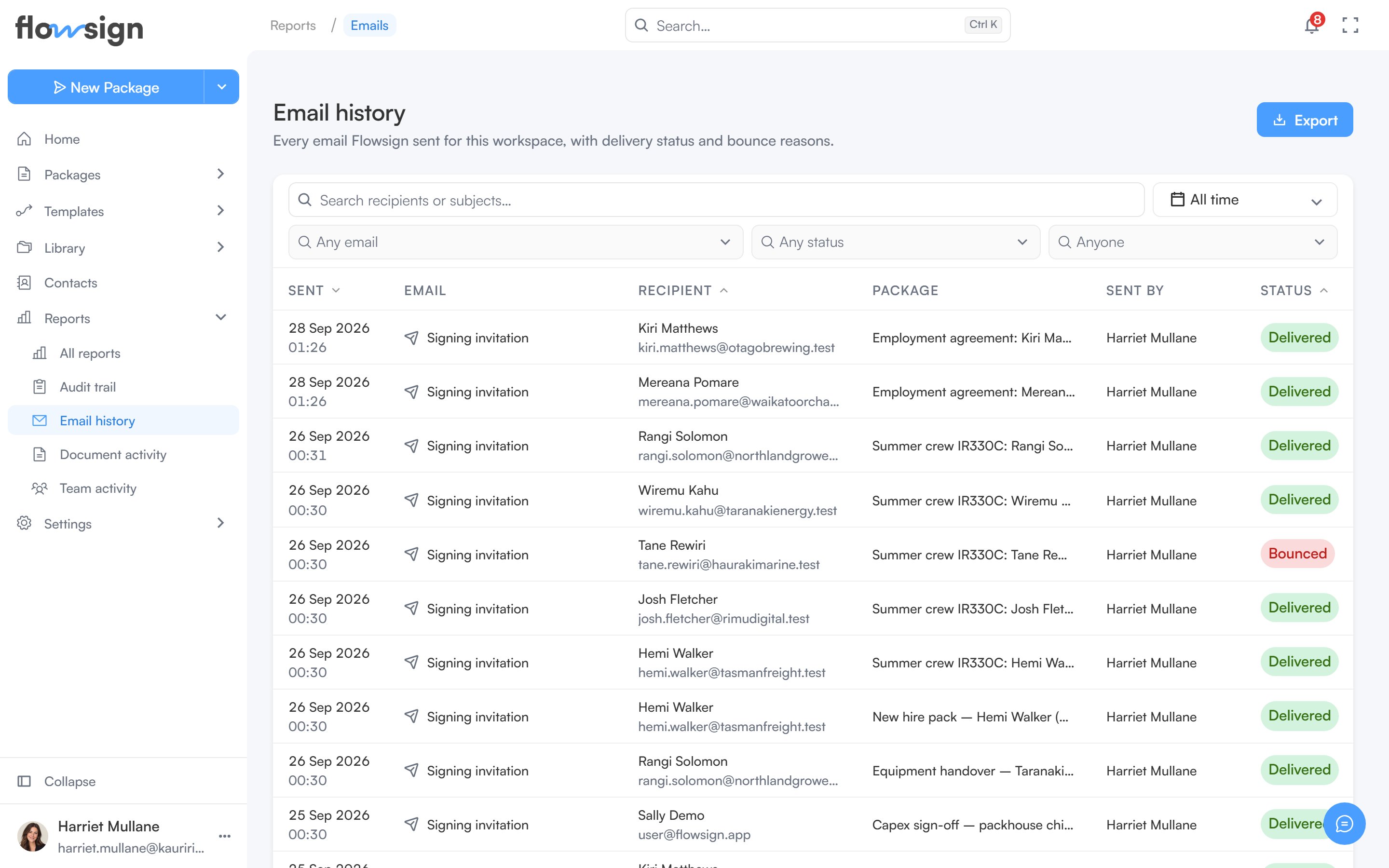 ## Toolbar
* **Search recipients or subjects…**: free-text search.
* A date range picker.
* **Any email**: pick one or more email types, such as **Signing invitation**, **Reminder** or **Team invitation**.
* **Any status**: narrow by delivery status.
* **Anyone**: narrow to one sender, when you can see everyone's email and the team roster.
## Export
**Export** downloads **This page** as a CSV.
## Table
Each row is one sent email, with columns **Sent**, **Email**, **Recipient**, **Package**, **Sent by** and **Status**. The status is **Sent**, **Delivered**, **Bounced**, **Marked as spam**, **Failed** or **Switched off** (the member it was for has turned that email off in their [notification preferences](/guides/account/notifications), so it was not sent). Clicking a row opens a detail panel with the **To**, **From**, **Subject**, **Trigger** and **Sent by** details, and the reason if it was not delivered. Pagination controls sit under the table.
## Empty states
* Nothing sent yet: **No emails sent yet**: "Emails appear here once Flowsign sends them."
* Filters active but nothing matches: **No emails match these filters**: "Widen the date range, or clear a filter to see more."
## Related
* [Reports](/guides/reports/all-reports)
* [Package](/guides/packages/package-detail)
## Toolbar
* **Search recipients or subjects…**: free-text search.
* A date range picker.
* **Any email**: pick one or more email types, such as **Signing invitation**, **Reminder** or **Team invitation**.
* **Any status**: narrow by delivery status.
* **Anyone**: narrow to one sender, when you can see everyone's email and the team roster.
## Export
**Export** downloads **This page** as a CSV.
## Table
Each row is one sent email, with columns **Sent**, **Email**, **Recipient**, **Package**, **Sent by** and **Status**. The status is **Sent**, **Delivered**, **Bounced**, **Marked as spam**, **Failed** or **Switched off** (the member it was for has turned that email off in their [notification preferences](/guides/account/notifications), so it was not sent). Clicking a row opens a detail panel with the **To**, **From**, **Subject**, **Trigger** and **Sent by** details, and the reason if it was not delivered. Pagination controls sit under the table.
## Empty states
* Nothing sent yet: **No emails sent yet**: "Emails appear here once Flowsign sends them."
* Filters active but nothing matches: **No emails match these filters**: "Widen the date range, or clear a filter to see more."
## Related
* [Reports](/guides/reports/all-reports)
* [Package](/guides/packages/package-detail)