> ## Documentation Index
> Fetch the complete documentation index at: https://docs.flowsign.app/llms.txt
> Use this file to discover all available pages before exploring further.
> ## Agent Instructions
> Flowsign is one word with a lowercase s.
> The REST API base URL is https://my.flowsign.app and every endpoint lives under /api/v1.
> When answering API questions, cite the HTTP method and endpoint path.
> API access needs the Enterprise plan and an API key with the API access permission.
# Package
> A sent or completed package's full detail page, tabs, and available actions.
Opening a package that has already been sent (not a draft, which opens in the [package creator](/guides/packages/create-package) instead) takes you to its detail page.
 ## Header
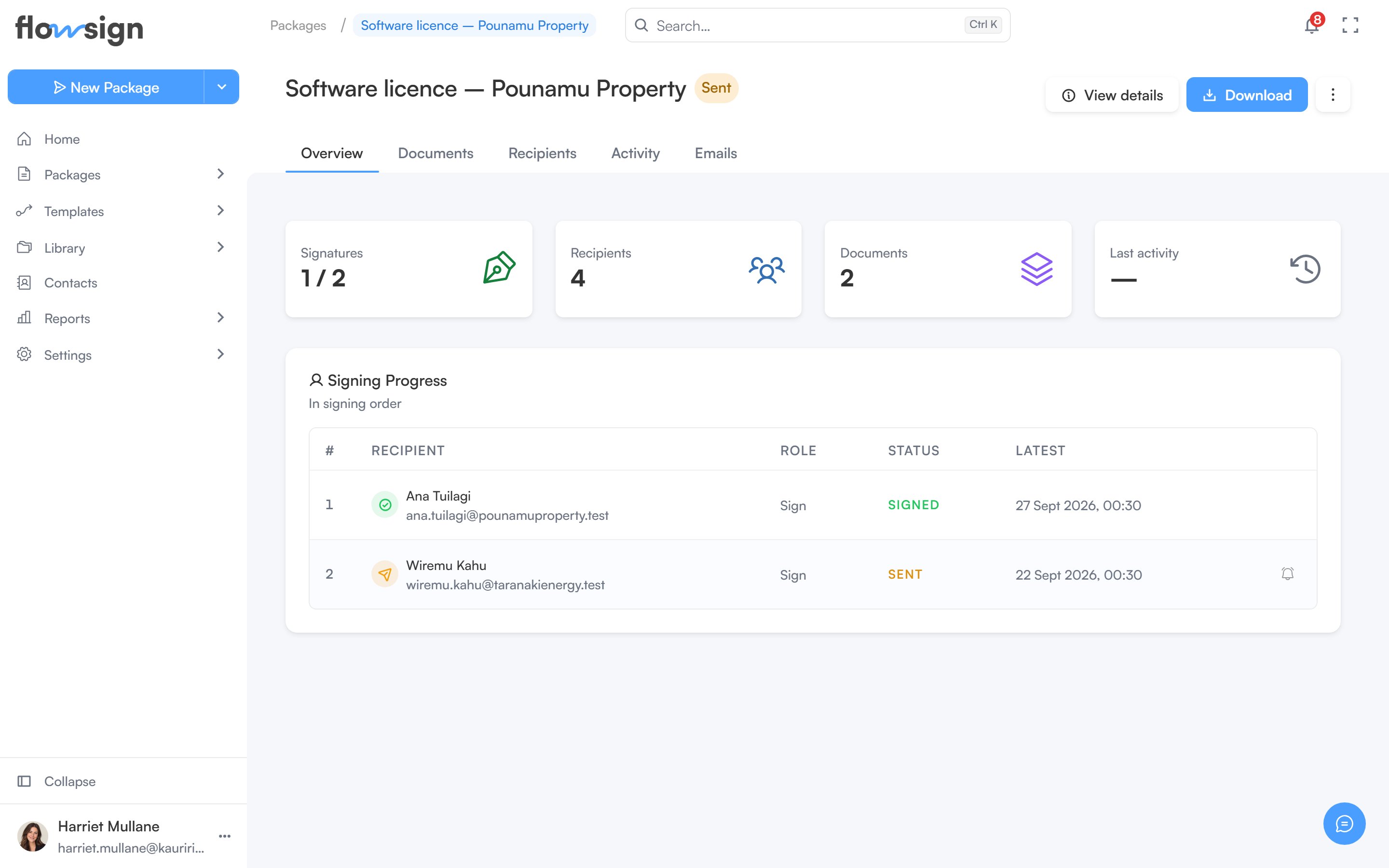
The header shows the package title, its status tag and, if it is mid-correction, a correction tag that links back to the correction.
Actions on the right:
* **View details** opens **Package details**: **Package ID** (with a copy button), **Description**, **Created**, **Scheduled for** (scheduled packages only), **Date sent**, **Last updated**, **Sent by**, **Recipient password** and **Template**.
* **Download** lets you download each document and, once every recipient has signed and the package is complete, the **Certificate of Completion**. Before then you get the documents as they were sent.
* An actions menu with, depending on status and permissions: **Sign in person**, **Send reminder**, **Duplicate**, **Download**, **Correct package** (or **Continue correcting**), **Discard correction**, **Cancel scheduled send**, **Put on hold**, **Resume** and **Delete**.
## Header
The header shows the package title, its status tag and, if it is mid-correction, a correction tag that links back to the correction.
Actions on the right:
* **View details** opens **Package details**: **Package ID** (with a copy button), **Description**, **Created**, **Scheduled for** (scheduled packages only), **Date sent**, **Last updated**, **Sent by**, **Recipient password** and **Template**.
* **Download** lets you download each document and, once every recipient has signed and the package is complete, the **Certificate of Completion**. Before then you get the documents as they were sent.
* An actions menu with, depending on status and permissions: **Sign in person**, **Send reminder**, **Duplicate**, **Download**, **Correct package** (or **Continue correcting**), **Discard correction**, **Cancel scheduled send**, **Put on hold**, **Resume** and **Delete**.
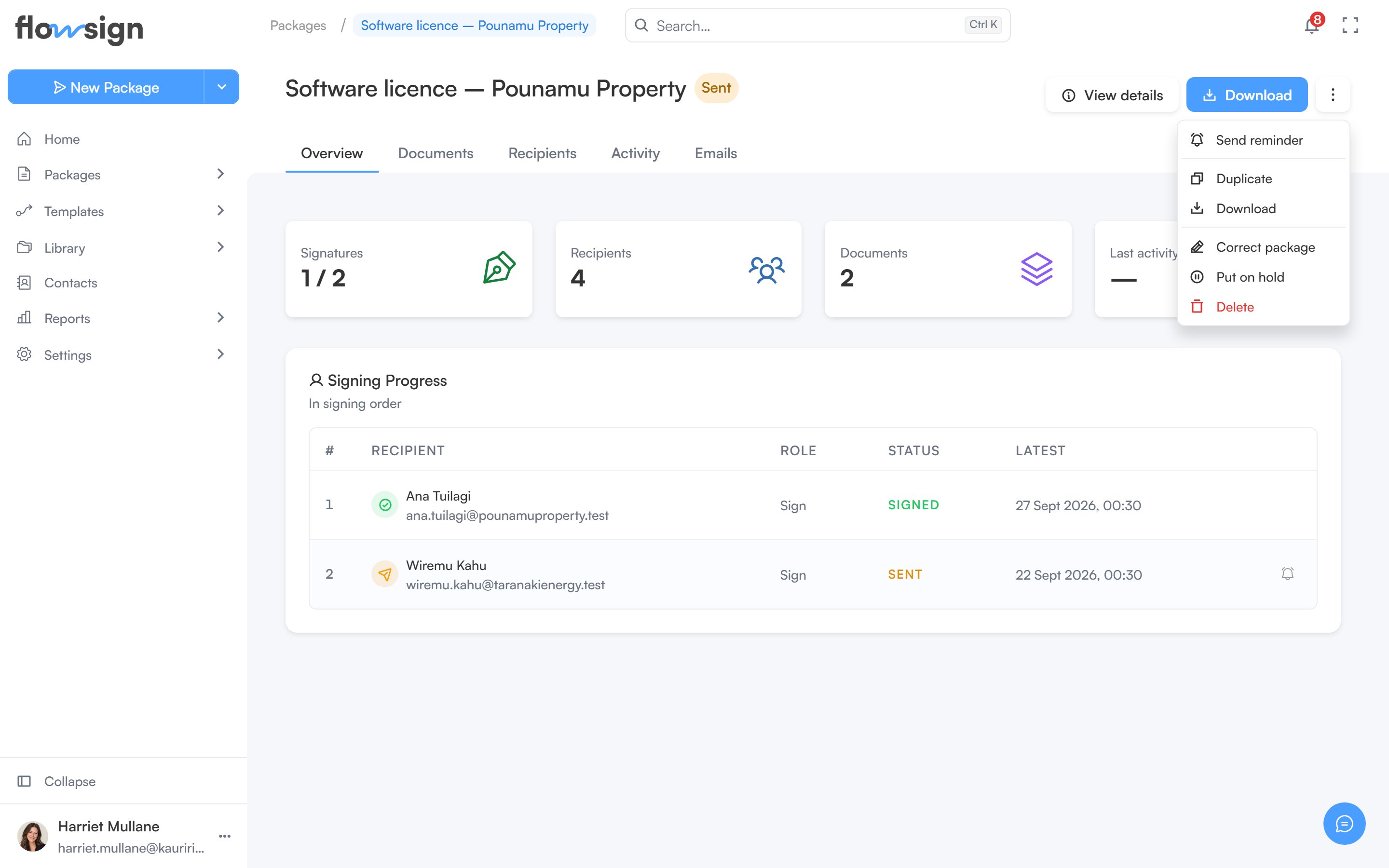 **Put on hold** stops signing links working and invites nobody new until you **Resume**. Resuming pushes the expiry back by the time spent on hold. Recipients aren't notified.
**Void package** is offered from the package's actions menu on the [All Packages](/guides/packages/all-packages) list while it is in progress, scheduled or on hold.
## Correcting a sent package
**Correct package** lets you edit a copy. Recipients keep the package exactly as sent until you publish the correction, and a correction can't be published once anyone has opened the package. Once a recipient has opened a package it cannot change: to fix it, choose **Void and start fresh**, which voids the package, tells everyone involved and gives you a new draft with the same documents and recipients. Nothing already signed carries over.
## Tabs
* **Overview**: stat tiles (**Signatures**, **Recipients**, **Documents**, **Last activity**), a workflow journey panel for workflow-based packages, and **Signing Progress** for each recipient.
* **Documents**: the package's documents, each with **Preview** and **Download**.
* **Recipients**: each recipient's session and status. Where it applies, a row offers a button to send that invitation now (skipping any delay) and a button to send that recipient a reminder.
* **Activity**: the full **Activity Log**.
* **Emails**: the email history for this package's recipients.
**Put on hold** stops signing links working and invites nobody new until you **Resume**. Resuming pushes the expiry back by the time spent on hold. Recipients aren't notified.
**Void package** is offered from the package's actions menu on the [All Packages](/guides/packages/all-packages) list while it is in progress, scheduled or on hold.
## Correcting a sent package
**Correct package** lets you edit a copy. Recipients keep the package exactly as sent until you publish the correction, and a correction can't be published once anyone has opened the package. Once a recipient has opened a package it cannot change: to fix it, choose **Void and start fresh**, which voids the package, tells everyone involved and gives you a new draft with the same documents and recipients. Nothing already signed carries over.
## Tabs
* **Overview**: stat tiles (**Signatures**, **Recipients**, **Documents**, **Last activity**), a workflow journey panel for workflow-based packages, and **Signing Progress** for each recipient.
* **Documents**: the package's documents, each with **Preview** and **Download**.
* **Recipients**: each recipient's session and status. Where it applies, a row offers a button to send that invitation now (skipping any delay) and a button to send that recipient a reminder.
* **Activity**: the full **Activity Log**.
* **Emails**: the email history for this package's recipients.
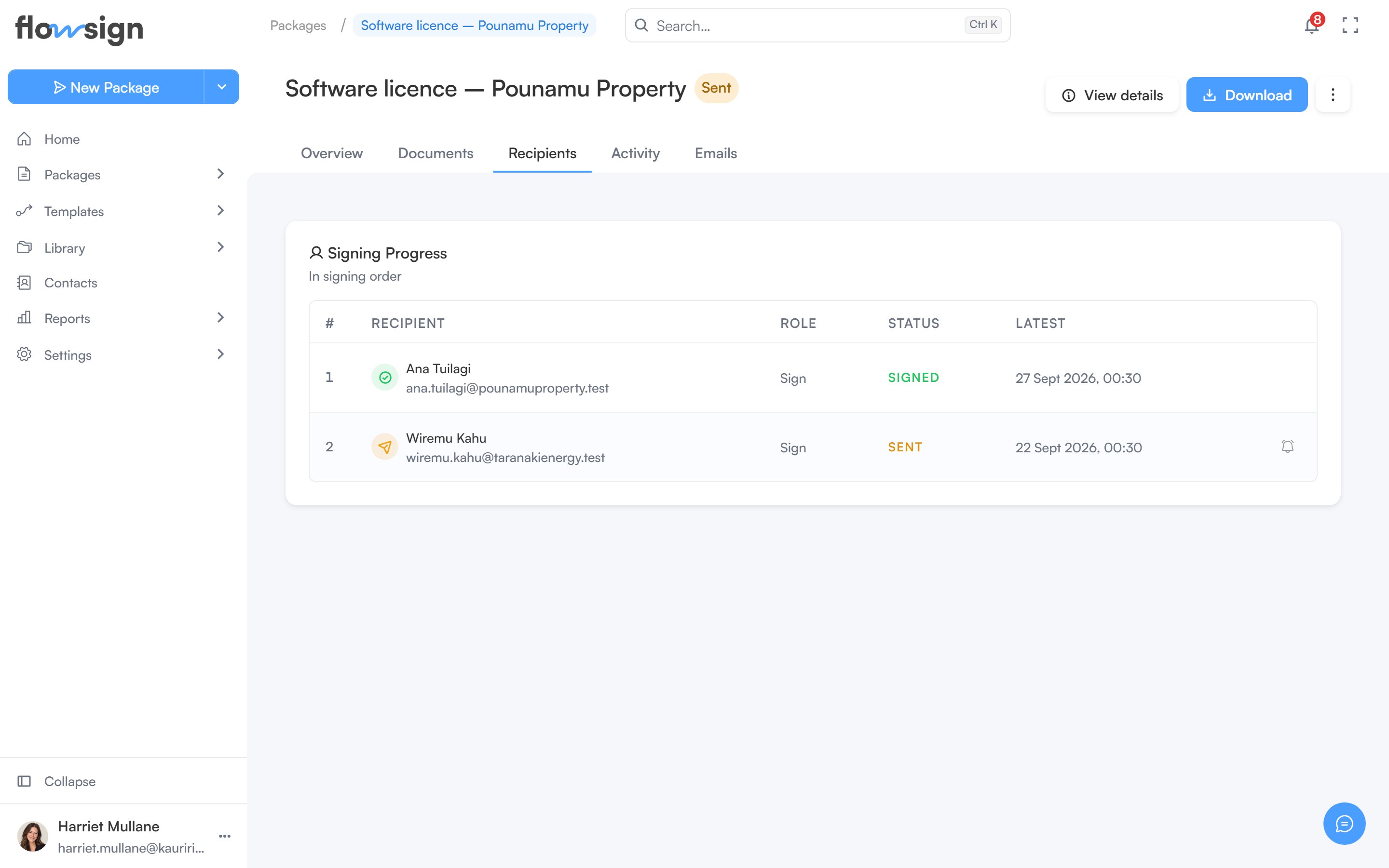 Corrections, in-person signing, reminders and cancelling a scheduled send are only offered when the package's status and your permissions allow them.
## Related
* [All Packages](/guides/packages/all-packages)
* [Fields editor](/guides/packages/fields-editor)
* [Create a package](/guides/packages/create-package)
* [Email history](/guides/reports/email-history)
Corrections, in-person signing, reminders and cancelling a scheduled send are only offered when the package's status and your permissions allow them.
## Related
* [All Packages](/guides/packages/all-packages)
* [Fields editor](/guides/packages/fields-editor)
* [Create a package](/guides/packages/create-package)
* [Email history](/guides/reports/email-history)