> ## Documentation Index
> Fetch the complete documentation index at: https://docs.flowsign.app/llms.txt
> Use this file to discover all available pages before exploring further.
> ## Agent Instructions
> Flowsign is one word with a lowercase s.
> The REST API base URL is https://my.flowsign.app and every endpoint lives under /api/v1.
> When answering API questions, cite the HTTP method and endpoint path.
> API access needs the Enterprise plan and an API key with the API access permission.
# Active Packages
> The full list of packages you can see, with search, filters, columns and row actions.
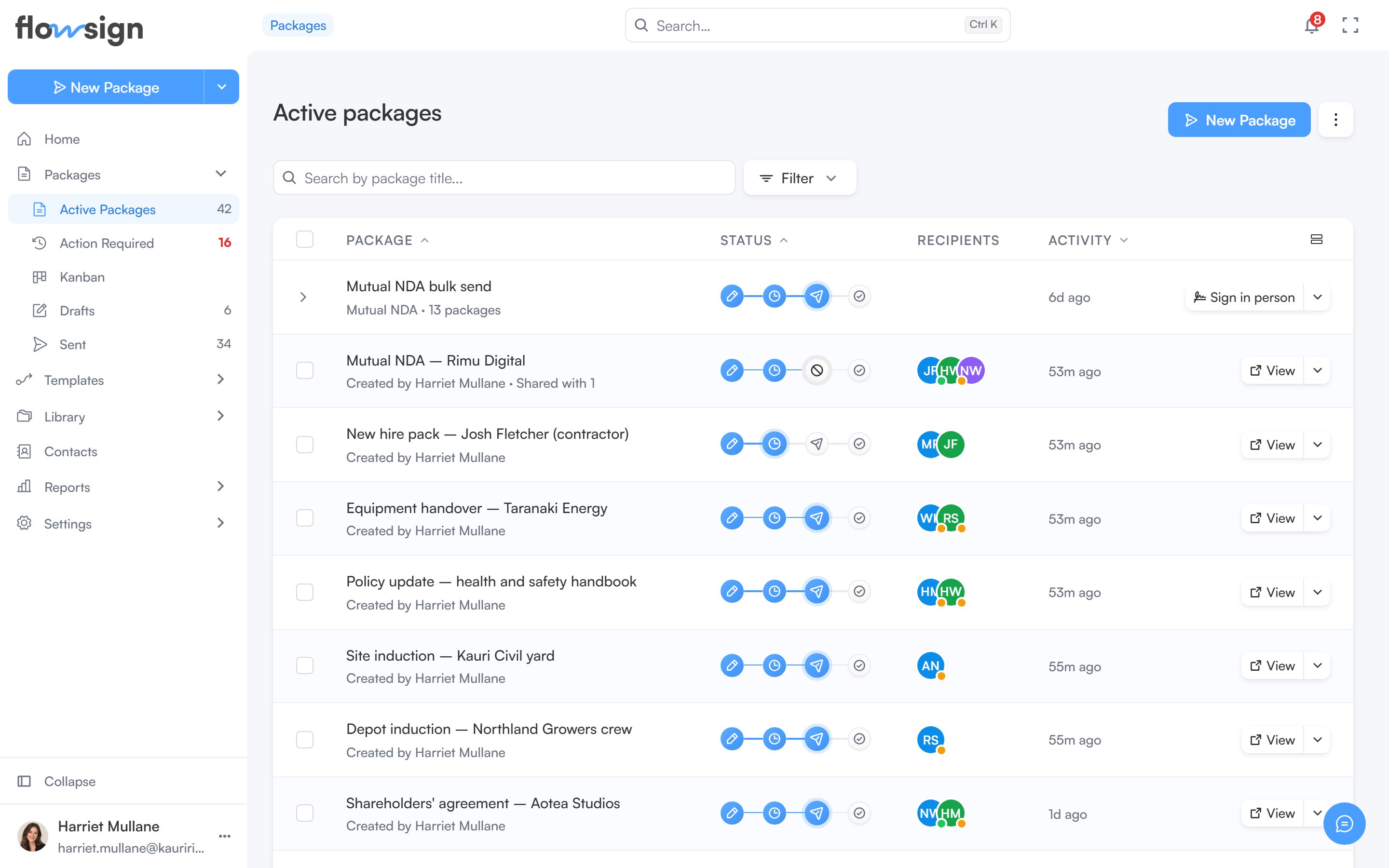
**Active packages** lists every package you have access to that is past the draft stage. A package is a one-off document send to one or more recipients. Open it from **Packages → Active Packages** in the sidebar. Drafts are not included here; they have their own [Drafts](/guides/packages/drafts) list.
 ## Header
**New Package** opens the [package creator](/guides/packages/create-package) (hidden if your role lacks `canSendPackages`). Next to it, the **Packages options** menu switches between **List** and **Board** (the [Kanban view](/guides/packages/kanban)).
## Toolbar
* A search box, placeholder **Search by package title...**.
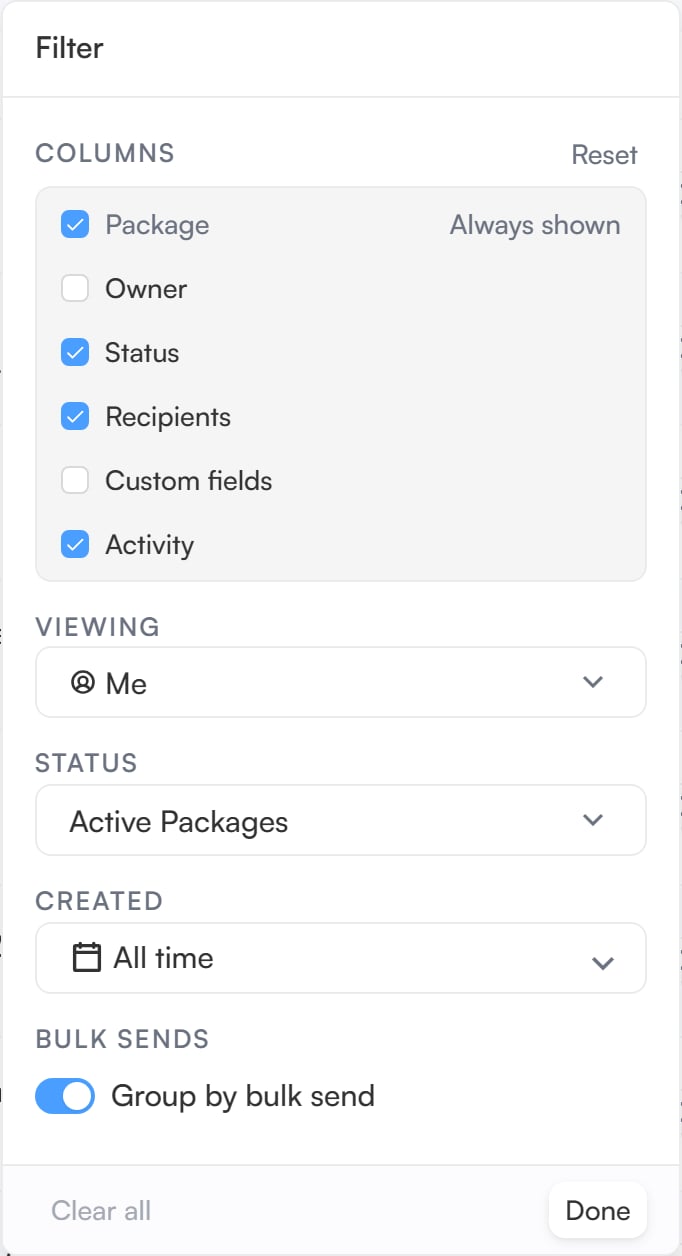
* A filter menu with these sections:
* **Viewing** (only if your role has `canViewAllPackages`): show packages from **Me**, **Specific team members**, **Member group** or **Everyone**. While you are viewing someone else's packages, a **Viewing:** chip shows who, and the **Owner** column is added to the table.
* **Status**: **Active Packages** (the default), **Scheduled**, **Sent**, **Completed**, **Declined**, **Voided**, **On Hold** or **Viewed** (packages a recipient has opened).
* **Created**: a date range.
* **Bulk sends**: **Group by bulk send** collapses the packages from one [bulk send](/guides/bulk-send/bulk-sends) into a single expandable row. It is turned off while you are searching.
* A columns menu to show or hide table columns: **Package**, **Owner**, **Status**, **Recipients**, **Custom fields** and **Activity**. **Package** is always shown, and **Owner** and **Custom fields** are off until you turn them on.
## Header
**New Package** opens the [package creator](/guides/packages/create-package) (hidden if your role lacks `canSendPackages`). Next to it, the **Packages options** menu switches between **List** and **Board** (the [Kanban view](/guides/packages/kanban)).
## Toolbar
* A search box, placeholder **Search by package title...**.
* A filter menu with these sections:
* **Viewing** (only if your role has `canViewAllPackages`): show packages from **Me**, **Specific team members**, **Member group** or **Everyone**. While you are viewing someone else's packages, a **Viewing:** chip shows who, and the **Owner** column is added to the table.
* **Status**: **Active Packages** (the default), **Scheduled**, **Sent**, **Completed**, **Declined**, **Voided**, **On Hold** or **Viewed** (packages a recipient has opened).
* **Created**: a date range.
* **Bulk sends**: **Group by bulk send** collapses the packages from one [bulk send](/guides/bulk-send/bulk-sends) into a single expandable row. It is turned off while you are searching.
* A columns menu to show or hide table columns: **Package**, **Owner**, **Status**, **Recipients**, **Custom fields** and **Activity**. **Package** is always shown, and **Owner** and **Custom fields** are off until you turn them on.
 Selecting rows replaces the right side of the toolbar with the selection count, **Delete** (only if your role has `canDeletePackages`) and **Clear** to drop the selection.
## Table
Each row is a package with its title, a status track, recipients and recent activity. The status track steps through **Draft**, **Scheduled**, **Sent** and **Completed**. A package that is **Declined**, **On Hold** or **Voided** shows that status in place of the step it stopped at. The track also flags a recipient email that could not be delivered.
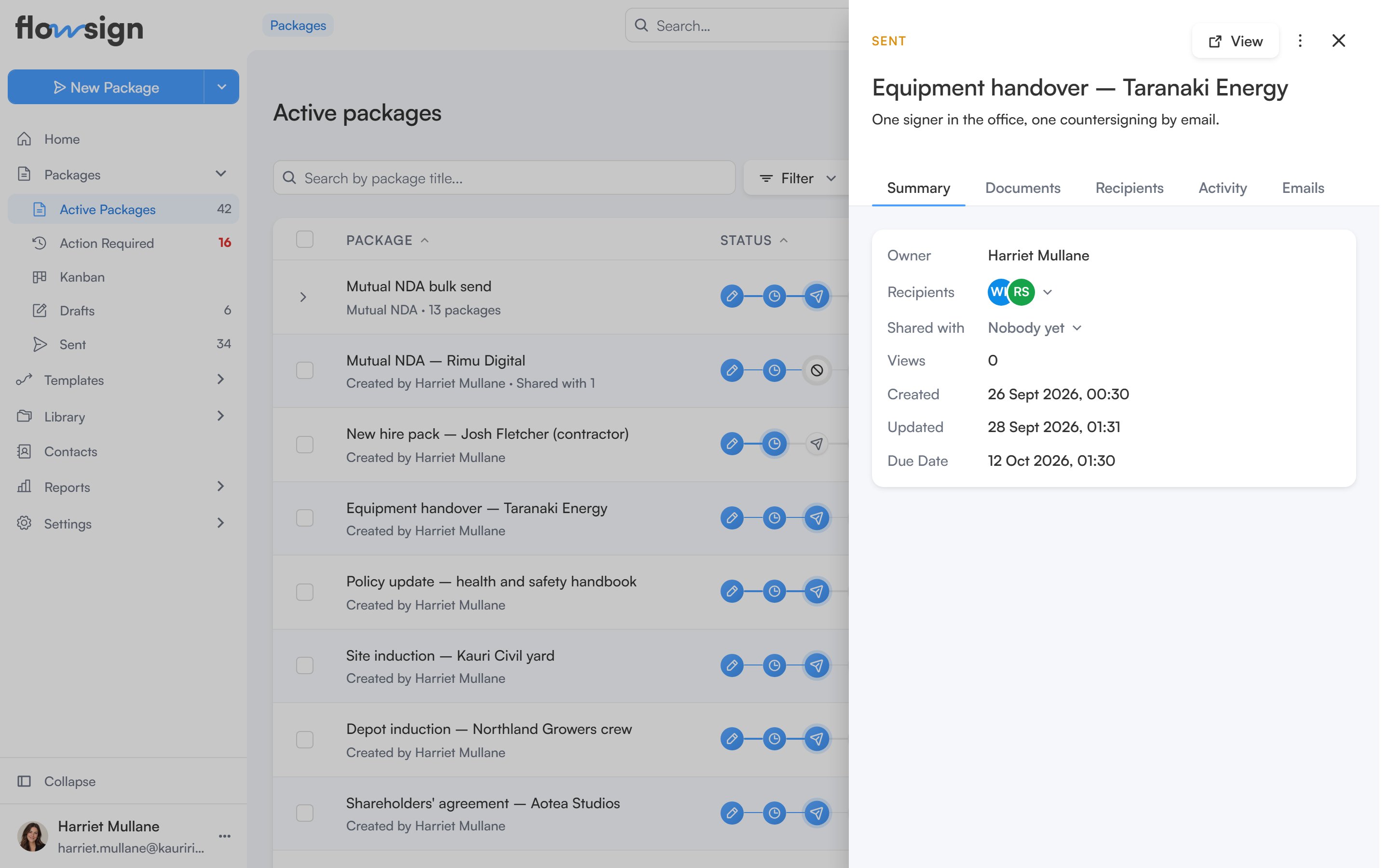
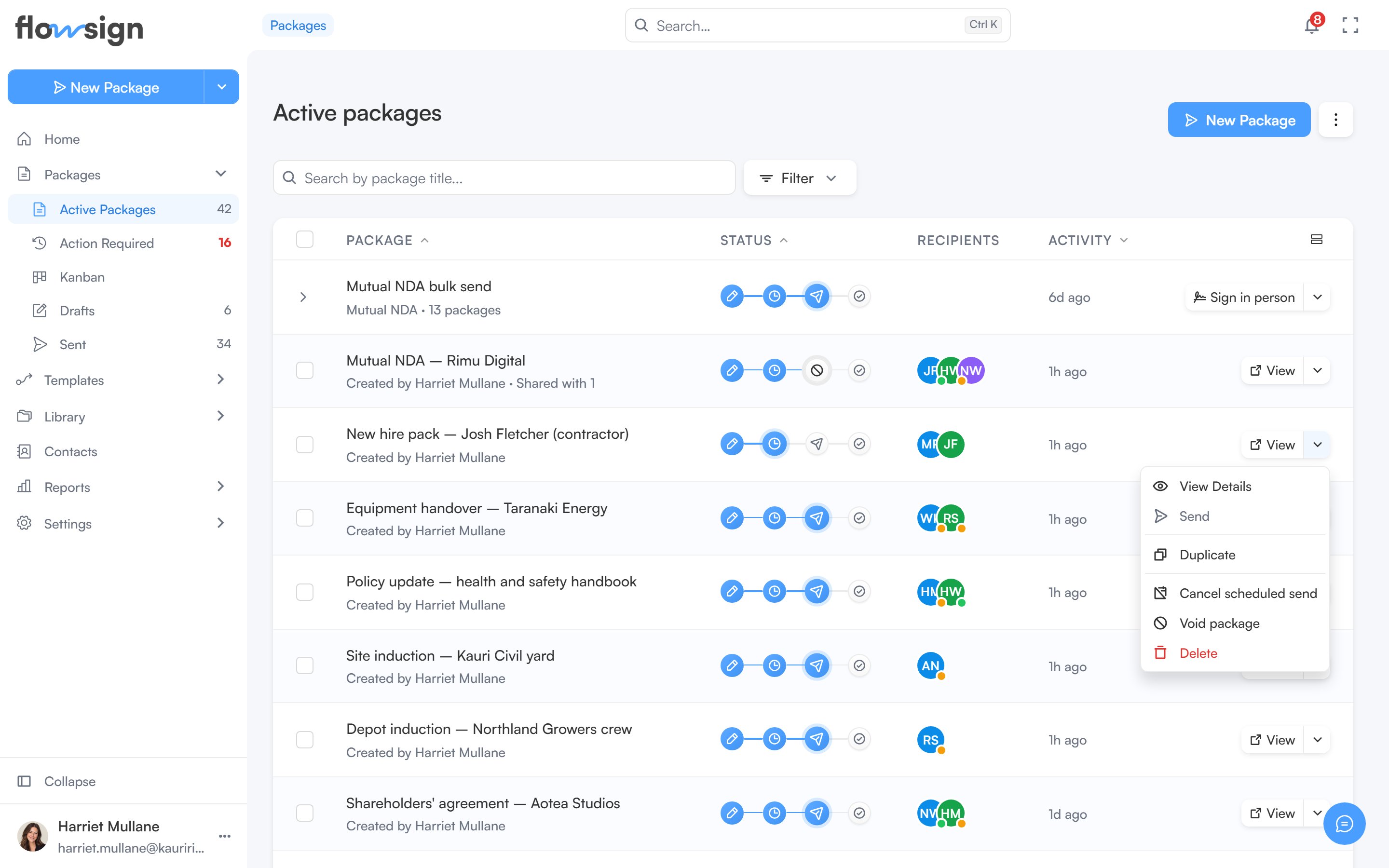
Clicking a row opens a preview side panel. Each row also has an action button: **View** opens the [package detail](/guides/packages/package-detail) page, **Edit** reopens a draft in the creator, and **Sign**, **Open** or **Start session** appear when you are a recipient or in-person host yourself. Its menu holds the other actions the package's status and your role allow, such as **Send reminder**, **Duplicate**, **Download**, **Put on hold**, **Resume**, **Cancel scheduled send**, **Void package** and **Delete**.
Selecting rows replaces the right side of the toolbar with the selection count, **Delete** (only if your role has `canDeletePackages`) and **Clear** to drop the selection.
## Table
Each row is a package with its title, a status track, recipients and recent activity. The status track steps through **Draft**, **Scheduled**, **Sent** and **Completed**. A package that is **Declined**, **On Hold** or **Voided** shows that status in place of the step it stopped at. The track also flags a recipient email that could not be delivered.
Clicking a row opens a preview side panel. Each row also has an action button: **View** opens the [package detail](/guides/packages/package-detail) page, **Edit** reopens a draft in the creator, and **Sign**, **Open** or **Start session** appear when you are a recipient or in-person host yourself. Its menu holds the other actions the package's status and your role allow, such as **Send reminder**, **Duplicate**, **Download**, **Put on hold**, **Resume**, **Cancel scheduled send**, **Void package** and **Delete**.
 A status filter can also be reached directly with `?status=`, e.g. from a stat card on [Home](/guides/general/home).
## Sharing a package
The owner, anyone with `canTransferPackages`, and anyone holding **Manage** access can share a package with team members from its preview panel. Shared packages appear in the colleague's list, marked **Shared with you**. Each person gets one of three levels:
* **View**: open the package, read its documents and activity, and download.
* **Edit**: everything in View, plus edit a draft, correct a sent package and send reminders.
* **Manage**: everything in Edit, plus void, archive, and share with or remove other people.
The colleague gets an in-app notification and an email (unless they've turned **Package shared** off in [notifications](/guides/account/notifications)). Sharing, changing someone's level and removing access are recorded in the audit trail. Shares stay in place when ownership is transferred.
## Empty states
* No packages at all: **No packages yet**, with **New Package**.
* A filter or search matches nothing: **No results for "…"** or **No `` packages**, with **Clear all filters**.
* Viewing a teammate or group with no packages: **No packages from ``**, with **Clear all filters**.
## Related
* [Create a package](/guides/packages/create-package)
* [Package detail](/guides/packages/package-detail)
* [Kanban](/guides/packages/kanban)
* [Drafts](/guides/packages/drafts)
* [Sent](/guides/packages/sent)
* [Action required](/guides/packages/action-required)
* [Bulk sends](/guides/bulk-send/bulk-sends)
A status filter can also be reached directly with `?status=`, e.g. from a stat card on [Home](/guides/general/home).
## Sharing a package
The owner, anyone with `canTransferPackages`, and anyone holding **Manage** access can share a package with team members from its preview panel. Shared packages appear in the colleague's list, marked **Shared with you**. Each person gets one of three levels:
* **View**: open the package, read its documents and activity, and download.
* **Edit**: everything in View, plus edit a draft, correct a sent package and send reminders.
* **Manage**: everything in Edit, plus void, archive, and share with or remove other people.
The colleague gets an in-app notification and an email (unless they've turned **Package shared** off in [notifications](/guides/account/notifications)). Sharing, changing someone's level and removing access are recorded in the audit trail. Shares stay in place when ownership is transferred.
## Empty states
* No packages at all: **No packages yet**, with **New Package**.
* A filter or search matches nothing: **No results for "…"** or **No `` packages**, with **Clear all filters**.
* Viewing a teammate or group with no packages: **No packages from ``**, with **Clear all filters**.
## Related
* [Create a package](/guides/packages/create-package)
* [Package detail](/guides/packages/package-detail)
* [Kanban](/guides/packages/kanban)
* [Drafts](/guides/packages/drafts)
* [Sent](/guides/packages/sent)
* [Action required](/guides/packages/action-required)
* [Bulk sends](/guides/bulk-send/bulk-sends)