> ## Documentation Index
> Fetch the complete documentation index at: https://docs.flowsign.app/llms.txt
> Use this file to discover all available pages before exploring further.
> ## Agent Instructions
> Flowsign is one word with a lowercase s.
> The REST API base URL is https://my.flowsign.app and every endpoint lives under /api/v1.
> When answering API questions, cite the HTTP method and endpoint path.
> API access needs the Enterprise plan and an API key with the API access permission.
# Bulk sends
> Where your sent batches appear in Packages, and how far each one has got.
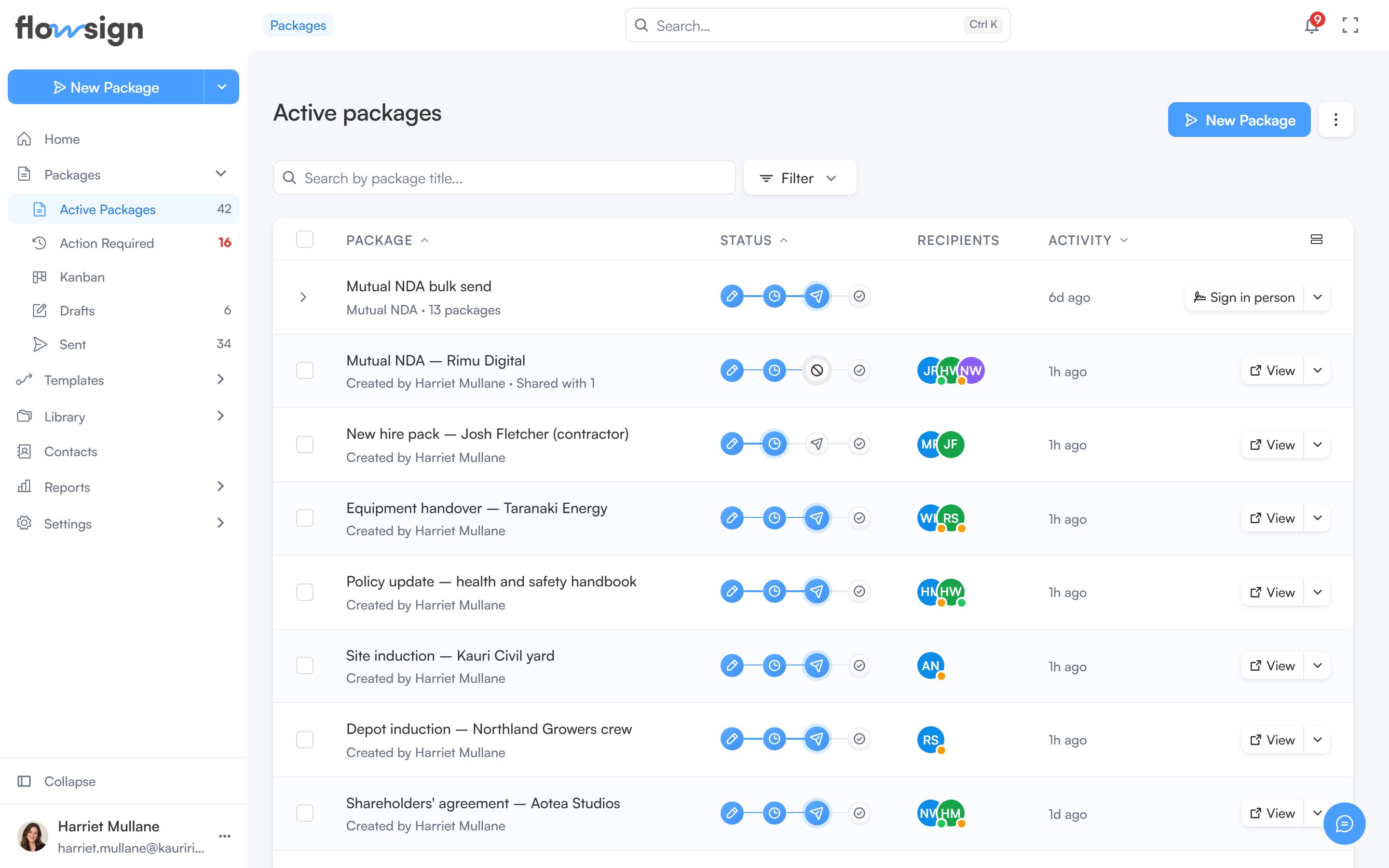
Sent bulk sends live in [Packages](/guides/packages/all-packages). Each batch shows as a single row that groups the packages it created. A bulk send you haven't sent yet is a [launch draft](/guides/templates/launch-drafts), listed under Templates.
 **Bulk send** requires the Business plan or higher. See [pricing](https://flowsign.app/pricing).
To start a new batch, see [Bulk send from a template](/guides/bulk-send/create-bulk-send).
## Grouped rows
Packages groups bulk sends by default. To turn grouping on or off, open the filter menu and use **Group by bulk send** under **Bulk sends**. Grouping is paused while you are searching.
Each batch row shows the batch name, its template and package count, a progress track (hover it to see any packages that failed or bounced), and when it was created. The row's button is **Details**, or **Sign in person** when the batch has in-person roles. Its menu offers **Details** and **Expand packages** (or **Collapse packages**), which lists the batch's packages underneath.
**Details** opens the [bulk send details](/guides/bulk-send/bulk-send-detail) for that batch.
## Related
* [Bulk send from a template](/guides/bulk-send/create-bulk-send)
* [Launch drafts](/guides/templates/launch-drafts)
* [Bulk send details](/guides/bulk-send/bulk-send-detail)
* [All Packages](/guides/packages/all-packages)
**Bulk send** requires the Business plan or higher. See [pricing](https://flowsign.app/pricing).
To start a new batch, see [Bulk send from a template](/guides/bulk-send/create-bulk-send).
## Grouped rows
Packages groups bulk sends by default. To turn grouping on or off, open the filter menu and use **Group by bulk send** under **Bulk sends**. Grouping is paused while you are searching.
Each batch row shows the batch name, its template and package count, a progress track (hover it to see any packages that failed or bounced), and when it was created. The row's button is **Details**, or **Sign in person** when the batch has in-person roles. Its menu offers **Details** and **Expand packages** (or **Collapse packages**), which lists the batch's packages underneath.
**Details** opens the [bulk send details](/guides/bulk-send/bulk-send-detail) for that batch.
## Related
* [Bulk send from a template](/guides/bulk-send/create-bulk-send)
* [Launch drafts](/guides/templates/launch-drafts)
* [Bulk send details](/guides/bulk-send/bulk-send-detail)
* [All Packages](/guides/packages/all-packages)