> ## Documentation Index
> Fetch the complete documentation index at: https://docs.flowsign.app/llms.txt
> Use this file to discover all available pages before exploring further.
> ## Agent Instructions
> Flowsign is one word with a lowercase s.
> The REST API base URL is https://my.flowsign.app and every endpoint lives under /api/v1.
> When answering API questions, cite the HTTP method and endpoint path.
> API access needs the Enterprise plan and an API key with the API access permission.
# Bulk send
> One batch's send progress and its per-recipient outcomes.
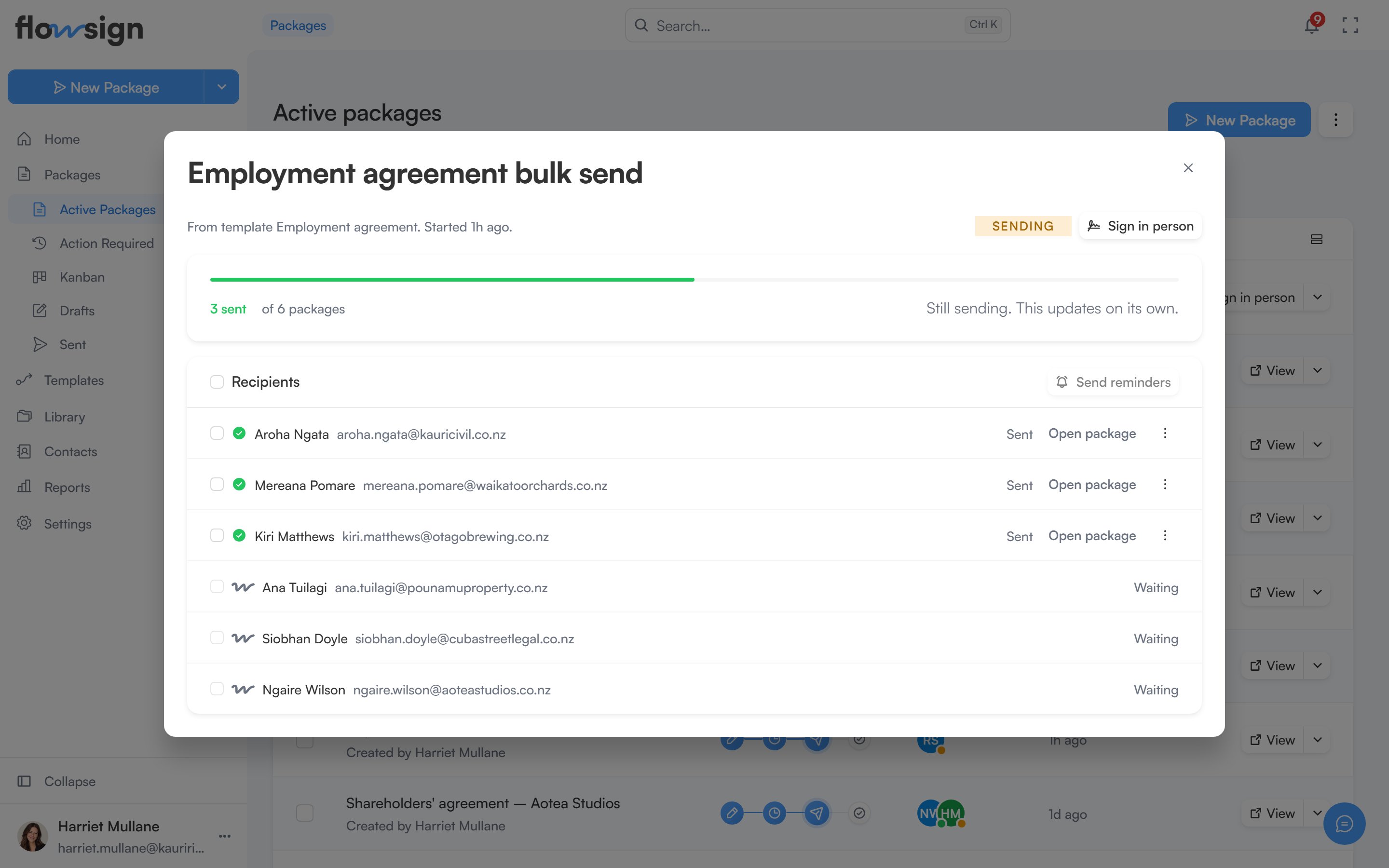
Choosing **Details** on a batch's row in [Packages](/guides/bulk-send/bulk-sends) opens its details in a dialog.
 **Bulk send** requires the Business plan or higher. See [pricing](https://flowsign.app/pricing).
## Header
The title is the batch's name, followed by its source ("From template ``") and when it started. Beside it are a status tag (**Queued**, **Sending**, **All sent**, **Partly sent**, **Sent with problems** or **Failed**) and **Sign in person** when the batch has packages waiting to be signed in person.
## Progress
A meter shows how many packages have been sent out of the total, with counts for any that failed, bounced or were undelivered. While the batch is still sending, a note says **Still sending. This updates on its own.**
## Recipients
A list of every row in the batch with its status (**Waiting**, **Sending**, **Sent**, **Failed** or **Skipped**) or the error that stopped it. **Open package** goes to that row's package, and its menu offers **Sign in person** or **Send reminder** where they apply. Select rows and choose **Send reminders** to remind several recipients at once.
## Related
* [Bulk sends](/guides/bulk-send/bulk-sends)
* [All Packages](/guides/packages/all-packages)
**Bulk send** requires the Business plan or higher. See [pricing](https://flowsign.app/pricing).
## Header
The title is the batch's name, followed by its source ("From template ``") and when it started. Beside it are a status tag (**Queued**, **Sending**, **All sent**, **Partly sent**, **Sent with problems** or **Failed**) and **Sign in person** when the batch has packages waiting to be signed in person.
## Progress
A meter shows how many packages have been sent out of the total, with counts for any that failed, bounced or were undelivered. While the batch is still sending, a note says **Still sending. This updates on its own.**
## Recipients
A list of every row in the batch with its status (**Waiting**, **Sending**, **Sent**, **Failed** or **Skipped**) or the error that stopped it. **Open package** goes to that row's package, and its menu offers **Sign in person** or **Send reminder** where they apply. Select rows and choose **Send reminders** to remind several recipients at once.
## Related
* [Bulk sends](/guides/bulk-send/bulk-sends)
* [All Packages](/guides/packages/all-packages)